
Yacht charter management app for crew
Charter management, simplified.
Charterly is the charter app built by yacht crew for yacht crew. Guests, itineraries, checklists, gratuities, crew and vessel records in one place, synced across iPhone, iPad, Mac and the web.
Try Pro free for 7 days. Cancel anytime in your Apple account.
A dashboard that runs the day
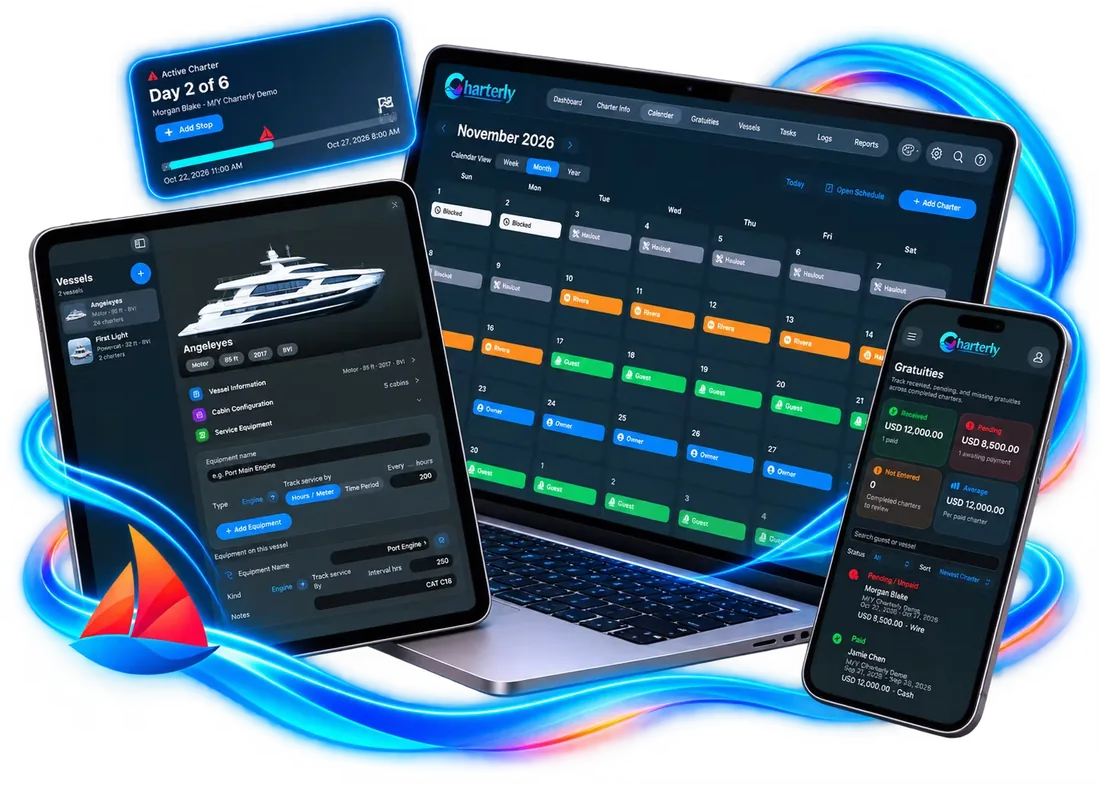
Every widget on the Charterly dashboard has one job. Show the ones you need, hide the rest, and the dashboard follows whichever vessel you pick.
 Active Charter
Everything has its tab
Eight tabs, laid out the same way on iPhone, iPad, Mac and the web app.
Dashboard
Widgets you choose: active charter, reminders, checklists, special events, service and parts, crew documents and notes.
Charter Info
Guest profiles, preferences, cabins, dietary notes, health and safety alerts, itineraries and photos for every charter.
Calendar
Month, week and year views of charters, holds, owner time and haul-outs, with a public link you can share.
Gratuities
Record every gratuity and get a nudge when one is still missing after a charter ends.
Vessels
Vessel details, crew members and their documents, engine service schedules and parts inventory.
Tasks
Pre-charter and post-charter checklists and to-dos you build once and reuse every trip.
Logs
Operations logs and forms, kept with the vessel and ready when you need them.
Reports
Printable charter, calendar and service history reports to share with owners and management.
Preference sheets, read for you
Upload a guest’s preference sheet PDF and Charterly’s AI fills in the charter for you to check. Nothing is saved until you tap Apply.
Here’s what the AI found
Fields you’ve already filled in are kept, so this only adds what’s missing.
- Guests
- Every name on the sheet, added to the charter party
- Dates
- Charter dates, compared with the ones you already have
- Details
- Dates of birth and nationalities for each guest
- Occasions
- Birthdays and anniversaries, sent to the dashboard
- Health
- Allergies and medical needs, flagged in red
Make it yours
Pick from 12 themes in the app, each in light or dark mode. Try a few here and this whole page changes with it. Now showing: Charterly.
Crew notes
A chalkboard right on your dashboardfor quick notes to the crew.
Pick the board and the chalk colour.
Questions about Charterly
The short answers crew ask before they download.
What is Charterly?
Charterly is a charter management app built for yacht crew. It keeps guest profiles and preferences, itineraries, checklists, gratuities, vessel details, crew documents, service schedules and reports in one place, synced across iPhone, iPad, Mac and a web app.
Who is Charterly for?
Working charter yacht crew: captains, mates, stews, chefs and engineers who run charters and want an organised record of every trip and a database of returning guests. It was built by a first mate and relief captain working charters in the British Virgin Islands.
What devices does Charterly work on?
Charterly is available on the App Store for iPhone, iPad and Mac, and as a web app at charterly-cloud.web.app. Your charters sync across all of them.
How does the AI preference-sheet fill-in work?
Upload a guest preference sheet and Charterly reads it, filling in guest names, dates of birth, nationalities, special occasions and health alerts. You review everything, and nothing is saved until you tap Apply. The document is processed only for that request and is not used to train AI models.
How much does Charterly cost?
Plans start at $7.99 a month for Pro, or $79.99 a year, with a 7-day free trial. Pro Plus and Pro Ultimate add more AI fill-ins and cloud storage. Subscriptions are billed through the Apple App Store and can be cancelled anytime.
Can I share my charter calendar with owners or brokers?
Yes. You can publish a public calendar link that shows the vessel’s name, photo and booked dates with their type, such as charters, holds and owner use. Guest names and contact details are never included.
Is guest information kept private?
Charterly does not sell personal information or use it for advertising. Data is stored with Google Firebase in the United States, with automatic backups, and you can delete records or your whole account from within the app.